Portable Monitor and Link Card
The Portable Monitor is a handheld screen. It streams the widget output of up to 8 computers without placing any monitor blocks — useful for drones, planes, or just checking your base from your inventory.
Crafting
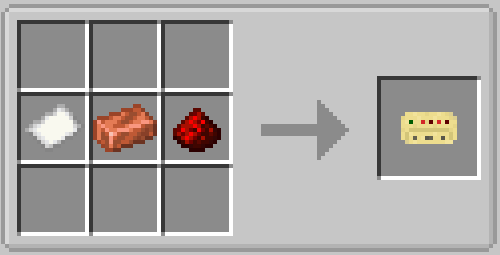
Link Card — one row: paper, copper, redstone.
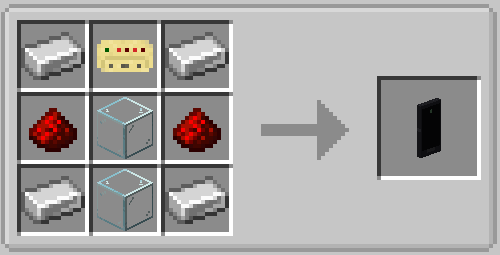
Portable Monitor — a shaped recipe: iron in the four corners, glass in the middle column, redstone left and right of the glass, link card on top.
Linking computers
- Right-click a computer with the Portable Monitor to add it as a channel. Right-click more computers to add more channels (up to 8; the same computer is never stored twice).
- Shift-right-click a computer to remove that computer from the channel list again.
- Shift-right-click in the air to clear all channels.
The item glows once it stores at least one channel, and its tooltip shows the linked position.
Using the screen
Right-click in the air to open the display. It shows the widgets of the active channel exactly like a wall monitor would — buttons, sliders, and text inputs are clickable.
- Click a channel tab (or press arrow left/right) to switch computers.
- Right-click a channel tab to remove that channel.
- ESC closes the screen; the game keeps running.
If the screen says no signal, the linked computer is probably not running a graph that feeds a Monitor node — see Monitors.
Same widgets, smaller screen
The portable canvas is 256×144 pixels with 6 rows, while a wall monitor starts at 64×64 pixels per block. All 12 widget types work on both.
Link Cards
A Link Card stores a reference to one computer:
- Right-click a computer to bind the card to it (the card glows and shows the position).
- Shift-right-click in the air to clear the binding.
Link cards have two uses:
- Copy a link: hold a bound card in your offhand and shift-right-click the air while holding the Portable Monitor — the monitor replaces all its channels with just this one computer.
- Authorization: anyone carrying a bound Link Card (in the inventory or offhand) can view and click the linked computer's displays, even from far away — there is no distance limit. This is what keeps drones and planes usable.
Computed Glasses use the same trick: they mirror your first bound card as a wearable HUD.
Limits at a glance
| Limit | Value |
|---|---|
| Channels per monitor | 8 |
| Screen | 256×144 px, 6 rows |
| Update rate | About every 0.75 seconds, only when the picture changes |
| Widget clicks | Forwarded to the computer (buttons, sliders, text inputs) |