Getting Started
This tutorial builds your first program: a monitor that shows the world time. It takes about five minutes and needs no Lua knowledge.
What you need
-
A Computer:
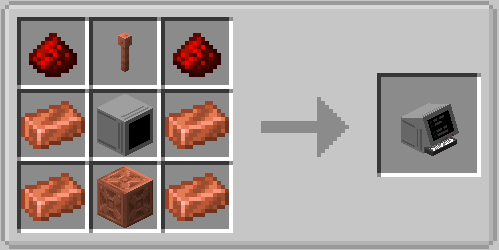
-
A Monitor block in front of the computer (the computer recipe needs one anyway).
Place the monitor first, then place the computer directly behind it so the monitor touches one of the computer's sides.
Step 1 — Open the editor
Right-click the computer. The node editor opens. This is where you wire nodes together. Everything is saved automatically — there is no save button.
Step 2 — Add three nodes
Press Tab (or right-click the empty canvas) to open the node picker. Type a few letters, press Enter to place the node. Repeat for all three:
| Find this node | Why |
|---|---|
| World Time | Reads the time of day as a number (0–24000). |
| Number Widget | Displays a number on a monitor. |
| Monitor | Sends widgets to the monitor block in front of the computer. |
Drag the nodes somewhere sensible. F zooms to fit everything.
Step 3 — Connect them
Drag from a node's output pin (right side) to another node's input pin (left side):
- World Time
time→ Number Widgetvalue - Number Widget
widget→ Monitorwidget_1
Widgets travel through the widget_1 input. The Monitor node has 16 of them (widget_1 …
widget_16) — press + on the node to add more, − to remove the last one.
Step 4 — See the result
Close the editor (ESC). The computer saves your graph on its own. The monitor in front of the computer now shows the world time, updating all day.
Something wrong?
Press F in the editor to see the whole graph. Check that every wire runs from a right-side
pin to a left-side pin. The Monitor node's Face field must match the side the monitor is on
(default: front).
Where to go next
- Docs button in the editor: over 120 ready-made example programs you can import with one click — see In-Game Documentation.
- Using the Editor: shortcuts, frames, comments, and all toolbar tools.
- Monitors: bigger screens, all widget types, and layout rules.
- Lua Node Authoring: write your own nodes in Lua.
- Node Catalog: every bundled node at a glance.