Computed Glasses
The glasses are a wearable HUD (added in 1.2.7). Wear them on your head and they show a status line for your linked computer — plus up to 16 live widgets from your graph, right in the world.
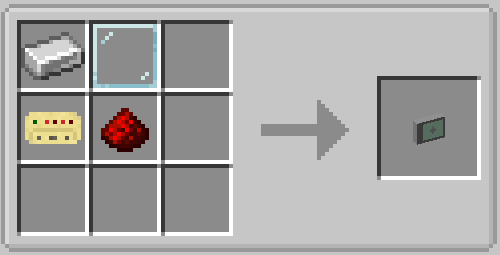
How it works
The glasses carry no binding of their own. They mirror the first bound Link Card they find on you — main inventory first, then the offhand. Right-click a computer with a Link Card to bind it, then put the card anywhere in your inventory and wear the glasses.
You now see a line like Connected with: Base (or the computer's x/y/z when it has no name). Anyone linked to the same computer — drone pilot, plane crew, base operator — sees the same widgets on their glasses.
Showing graph widgets on the glasses
Use the Glasses HUD node (Widgets category) exactly like a Monitor node: it has 16 widget
inputs (widget_1 … widget_16), + adds one, − removes the last. Wire any widget nodes
into it — text, numbers, buttons, progress bars — and every player wearing glasses linked to this
computer sees them.
Line-layout widgets hug their content on the glasses — a short label stays a short label
instead of stretching across the whole HUD. Set a widget's Fit field to fill when you want
a full-width row.
Adjusting the HUD (press K)
With the glasses equipped, press K to enter edit mode:
- Double-click empty space to add a new HUD line.
- Drag a line to move it, use the handle to resize, double-click to edit its text, color, and scale.
- The Graph widgets box moves and rescales the whole widget region.
- Save when you are done; ESC cancels.
Every HUD line is a text template. Available placeholders:
| Placeholder | Replaced with |
|---|---|
{computer} |
Computer name, or its position when unnamed |
{x} {y} {z} |
Computer coordinates |
{dimension} |
Dimension ID |
Positions and scales are stored per element (normalized 0–1, so they survive resolution and GUI
scale changes) in config/computed-glasses-hud.json.